Create a Membership Plan
Create a Membership Plan
How to Create an Annual Membership Plan
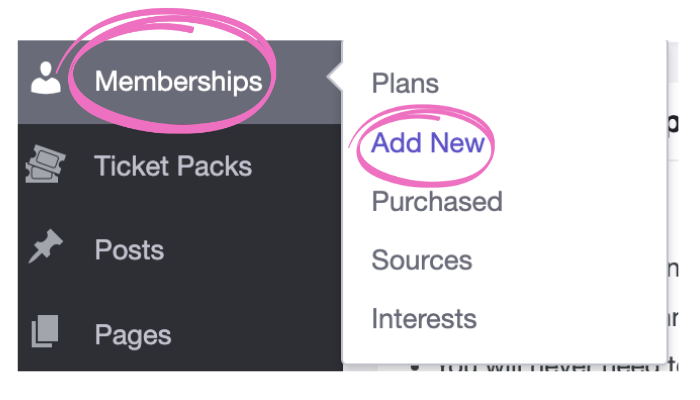
- When logged into your festival dashboard, visit Memberships
- Choose Add New
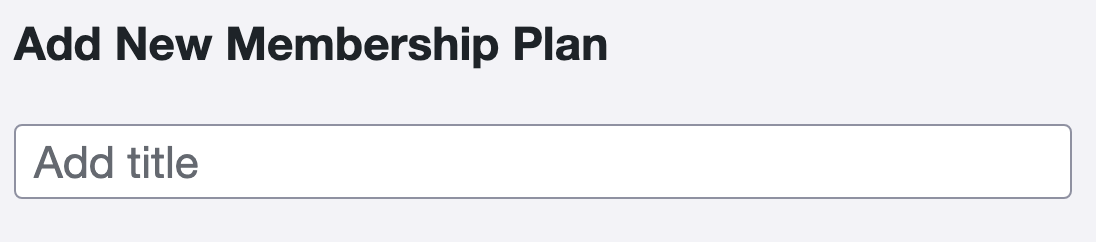
- In the Add title field, type in the name of your Membership Plan [Required]
- In the Paragraph section, type in all the details about this membership. It is recommended to list all benefits, including the ones you might fulfill outside of Filmbot, such as merchandise.
- This content will be displayed on the Sign Up page for this membership plan, above the signup form.
Membership Plan Details
This table showcases the various customizations available for crafting this specific membership plan.
Field name | Field description |
|---|---|
Benefits Summary | The space allows you to concisely list all the top features that come with a membership. NOTE: We recommend using a bulleted list. |
Reported Cost | [Optional] The cost that will appear in the distributor reports when a ticket is discounted using the membership. If this field is not entered, the reported price will default to report the discounted price of the ticket. |
Plan cost | Annual
|
Collect birthdays? | This setting is not currently implemented. Check this box if you want members to enter their birthday during sign-up. NOTE: Even if you check the box, providing the birthday remains optional for members. |
Make birthdays required? | This setting is not currently implemented. Check this box if you want members to be required to enter their birthday when signing up. NOTE: This option only appears if Collect birthdays? is checked. |
Collect member mailing addresses when they are purchased as a gift? | Check this box if you want customers purchasing gift memberships to enter the recipient's mailing address at checkout. |
Make member mailing addresses required for gift purchases? | Check this box if you want customers purchasing gift memberships to be required to enter the recipient's mailing address at checkout. NOTE: This option only appears if Collect member mailing addresses when they are purchased as a gift? is checked. |
Interests label | The interest label is a custom question you can ask your members when they sign up, such as "What types of events are you interested in?" |
Interests | The Interest options linked to your Interests question will be shown here. Choose the options you want to appear on your sign-up page or choose "Select All" to include all options. You can add or edit the available Interests in Memberships > Interests. |
How did you hear about us label | This is a custom question that allows you to get information from your new members on where they had heard about your cinema and membership plan. If left blank, the question will be "How did you hear about us?". It can alternatively be used for any multiple-choice question that can have a single answer. |
How did you hear about us? | New members can select these options to answer the "How did you hear about us?" question. You can add or edit the possible responses to this question in Memberships > Sources. It can alternatively be used for any multiple-choice question that can have a single answer. |
Terms of Service | Provide the terms of service that the customer must agree to on the signup form. The text should be brief; it displays next to a checkbox on the signup form. The field can accept HTML if you want to link out to a longer description of your terms. |
Confirmation message | Enter a message to display to the customer after their purchase, as well as in their confirmation email. |
Membership Plan Rules: Tickets
This table presents the different settings for establishing rules related to ticket sales for this specific membership plan.
Field name | Field description |
|---|---|
Discount Type | Choose between two options:
|
Amount off / Discount off per ticket | Once you've chosen your Discount Type, enter the specified dollar amount or percentage into the provided box. |
Minimum ticket price | [Optional] Enter a price to prevent tickets from being discounted below this value. |
Minimum ticket quantity required in the order | [Optional] The minimum number of tickets that must be included in a single order before the membership discount can apply |
Discounted tickets allowed per term | [Optional] The number of discounted tickets permitted for each member's term. Leave blank if there's no limit. |
Discounted tickets allowed per showtime | The number of discounted tickets permitted for each showtime. This number will be reset when the membership is renewed. |
Maximum outstanding tickets allowed at once | [Optional] This sets the maximum number of discounted tickets a member can have at any time. Leave blank for no limit. Once a customer has reached this limit, they will need to wait for one of the showtimes they have tickets for to begin before they can discount more tickets. |
Maximum showtimes allowed per date | [Optional] The maximum number of showtimes each day that can be discounted. Leave blank for no limit. |
Does discount apply to the booking fee? | Check or uncheck the box to specify whether the applied discount also reduces the booking fee associated with the ticket purchase. |
Eligible Ticket Types | [Optional] If the membership applies only to certain ticket types, choose those types from the dropdown menu. Leave it blank to include all ticket types. |
Eligible Showtimes | [Optional] If the membership applies only to specific showtimes only, choose those types from the dropdown menu. Leave it blank to include all showtimes. |
Ineligible Showtimes | If the membership excludes specific showtimes, choose those types from the dropdown menu. Leave it blank to include all showtimes. |
Membership Plan Rules: Products
If you have Products enabled for your festival, this table presents the different settings for establishing rules related to product purchases, such as concessions, for this specific membership plan.
Field name | Field description |
|---|---|
Discount Type | Choose between two options:
|
Amount off/Discount off per item | Once you've chosen your Discount Type, enter the specified dollar amount or percentage into the provided box. |
Discounted products allowed per term | [Optional] The number of discounted items permitted for each member's term. Leave blank if there's no limit. |
Eligible Products | [Optional] If the membership applies only to specific products, choose those types from the dropdown menu. Leave it blank to include all products. |
Publish Your Membership Plan
Now that you've created your membership plan, press the Publish button to make it official.
Here are the different statuses you can use with your membership plans:
Field name | Field description |
|---|---|
Save Draft | Pressing Save Draft will save this page. It will not publish and activate the membership plan. |
Status |
|
Visibility |
|
Publish Immediately |
|
Move to Trash | To delete the Membership Plan, use the Move to Trash link. |
Changing Membership Settings
Admins can make several changes to a membership plan once it is published.
Changes you can make to a membership anytime:
- Name
- Description & benefits
- Terms of Service, Confirmation Message, Expiration Reminder
- Discount rules
- Price
Changes you cannot make to a membership once they have any active members:
- No membership plans can be moved to the trash if they have active members.